Note: Functionality for populating regional data based on a country entry is only available for AddressTools Premium, if you are using AddressTools Free then you can trial our AddressTools Premium application to take advantage of this feature plus many more that it includes. This guide only applies to United States of America based addresses.
What Does This Guide Achieve?
After following this guide, you will have successfully configured a field that automatically populates with the appropriate Primary County corresponding to the ZIP code entered. This example will use the Account object.
Creating the Necessary Lookup Fields
To begin, you will need to create the three necessary lookup fields:
Country LookupState LookupZIP Code Lookup
To achieve this, follow this guide, ensure that you use the address block which you intend to implement this functionality on.
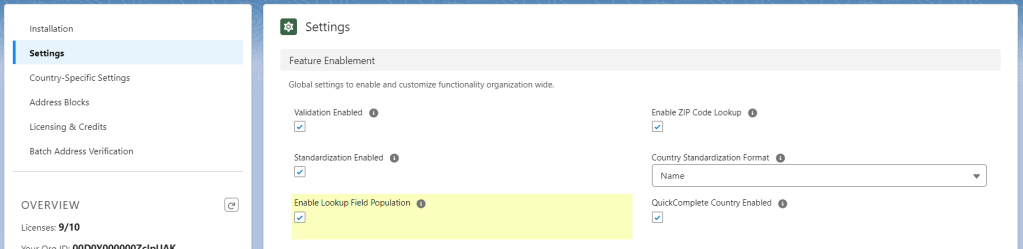
After creating these fields, you will need to enable the lookup field population:
- Go to
App Launcher | AddressTools Administration. - Select
Settingsfrom the sidebar. - Click the pencil next to
Enable Field Lookup Population. - Tick the
Enable Field Lookup Populationcheckbox. - Click
Save.
Adding the lookup fields to the Address Block
- Navigate to
AddressTools Administration Page | Address Blocks - Select the Down arrow next to the relevant address blocks and click
Edit - Under the
Lookup Fieldssection, select the fields that you just created and clickSave

Creating a Formula Field to Display the County
- Navigate to
Setup | Object Manager | [Object you are using] - Select
Fields & Relationships | New - Select
Formulaand thenNext - Name the field and choose the Return Type as
Textthen clickNext - Select
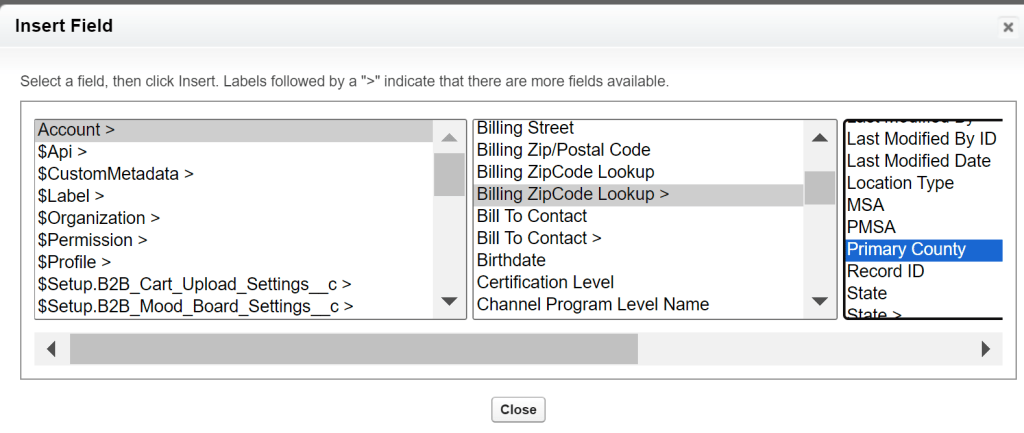
Advanced FormulathenInsert Field - Select
[Object you are using]–[ZipCode Lookup field that you created in the previous step]–Primary County
Note: You will need to configure the Field-Level Security for this field and add it to your Page Layout to meet your desired criteria.
Now with the formula field created and on the page layout, when the record is saved with a valid USA based ZIP Code value, the value from the associated county record will now appear in the lookup field.
Contact Us
If you have any questions in relation to this article, contact us at: support@provenworks.com We will be happy to answer any questions or problems that you may have.