Blog

PhoneTools features in your Trialforce org

PhoneTools screens telephone numbers stored in your Salesforce org against the UK Telephone Preference Service (TPS) and corporate TPS (CTPS) databases – helping you to remain compliant with UK data-protection and marketing laws. 

If you haven’t already, get more information on the setup of your Trialforce org by reading the Introduction to your PhoneTools Trialforce org article.

Screening Statuses

Here’s a quick breakdown of the simple screening status PhoneTools provides for each number: 

  • Green – Not Listed   
  • Red – Listed   
  • Blue – Not Screened  
  • Orange – Due for screening  
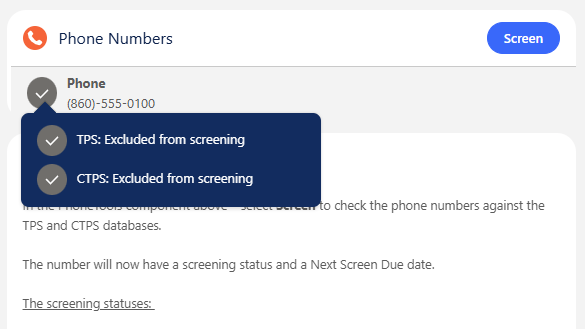
  • Grey – Excluded from screening (due to a formula field)   

These statuses are displayed in the PhoneTools lightning record page component alongside each of the phone numbers that are configured for screening – additional information is revealed by hovering your mouse over the status icon. 

The status will show as Red – Listed if the number is found in either of the TPS and CTPS databases. This means the Green – Not Listed status represents the number not existing in either of the databases.

PhoneTools will populate a Next Screen Due date 21 days from the initial screening where the status will change to Due for screening to remind you to rescreen all numbers within the 28-day legal requirement. It is recommended to automatically screen records enabling the inbuild functionality. This will process all Not Checked/ Due for screening numbers at a daily time, or for further customisation you can create a Flow to programmatically fire screening. 

The Grey – Excluded from screening status only appears if there is a formula field present and the number does not meet the requirements to be screened with PhoneTools. For example, in the Trialforce org any Lead or Contact record without a UK address will be excluded from screening due to the formula field created.

Record Level Statuses 

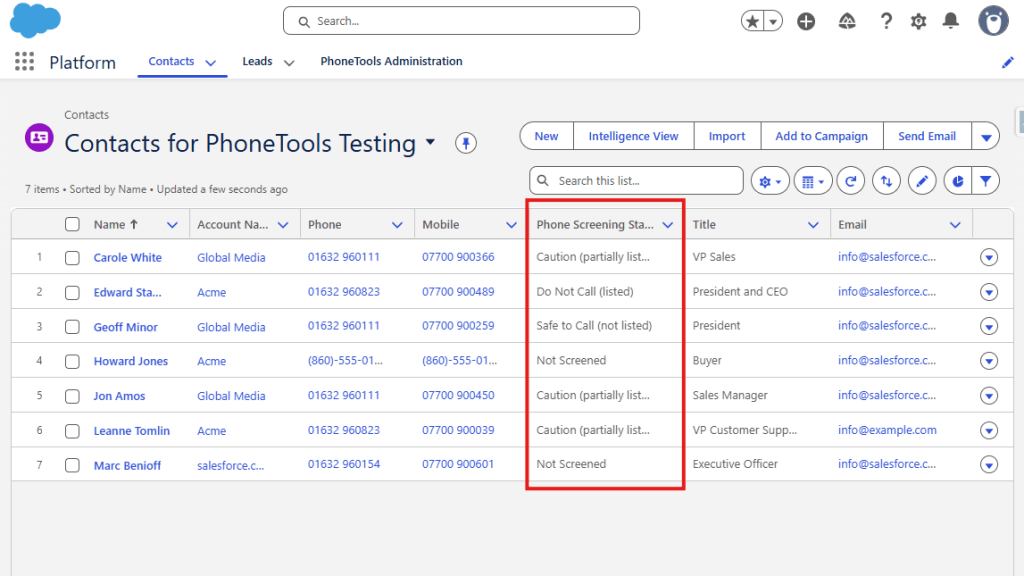
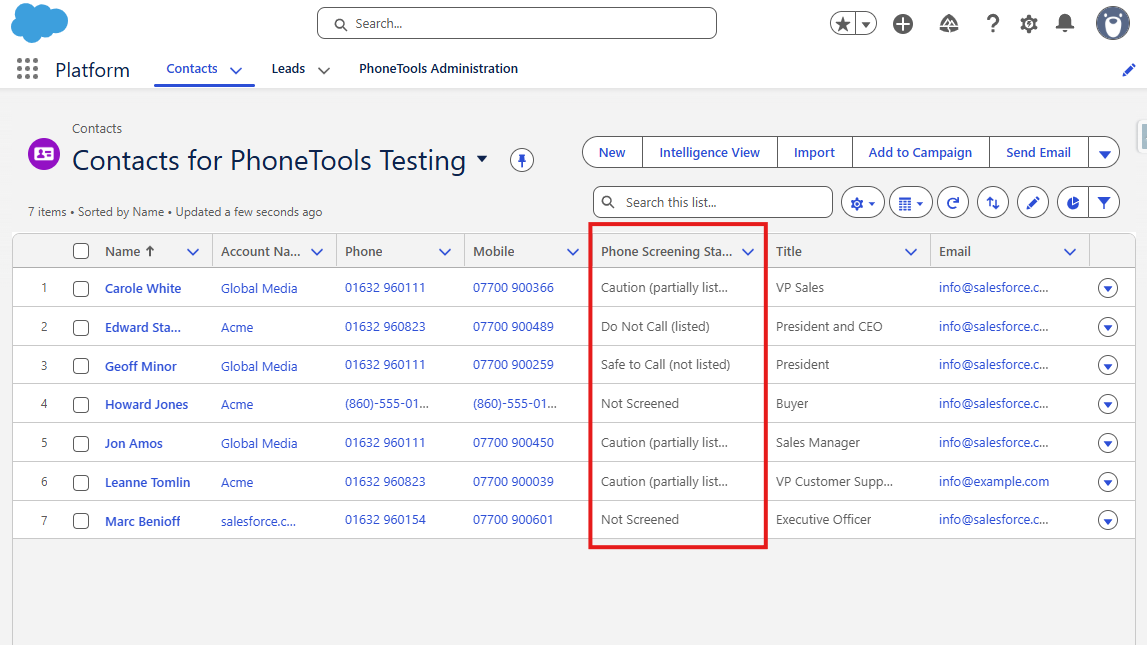
Under the Contacts and Leads tabs in the pinned list views, you’ll see a ‘Record Screening Status’ which summarises the screening status for all numbers on that record: 

  • Safe to Call (not listed) – All numbers on the record are considered safe to call as they are not listed. 
  • Caution (partially listed) – The record contains both numbers that aren’t listed as well as numbers that are.  
  • Do Not Call (listed) – All numbers on the record are listed in either database 
  • Not Screened – The record contains phone numbers that have not yet been screened against the configured databases or are excluded. 
  • Error – There is an issue with one or more of the numbers that exist on the record 

These record statuses give you a quick overview. For a detailed breakdown of each status, use the Lightning component inside the record itself. 

What to do on your org

For some introduction tasks to get you acquainted with PhoneTools look at the Tasks to complete on your PhoneTools Trialforce org article. This will guide you through some of the basic features of PhoneTools using the preconfigured Trialforce org, looking at screening records, formula fields and batch screening processes. 

We hope you enjoy exploring PhoneTools and it gives you a clear understanding of how it will help you maintain compliance and manage your phone-based outreach safely and efficiently. If you have any questions or would like further guidance, our team is here to help. 

Introduction to your PhoneTools Trialforce org

The PhoneTools Trialforce org gives you a way to explore all the features of PhoneTools without the needing a custom installation or setup. Use it to evaluate how PhoneTools can help you manage phone number screening against TPS and CTPS databases in your Salesforce environment before committing to a full implementation.  

If you haven’t already, head to the Salesforce AppExchange and sign up for a PhoneTools Trialforce org to get started. 

How the org is set up

When you first log in to your Trialforce org, navigate to the Platform app shown below. You’ll see tabs for Contacts, Leads and PhoneTools Administration. 

We have pre­populated this org with sample Contacts and Leads (including telephone numbers) so you can begin testing right away. Make sure to select List View in the top right of the Contact page, similarly for Leads.

You can see all Contacts by selecting the “Contacts for PhoneTools Testing” list, similarly for Leads.

Feel free to pin these list views for ease, as they include a column for ‘Phone Screening Status’ so you can see immediately which records have been screened.  

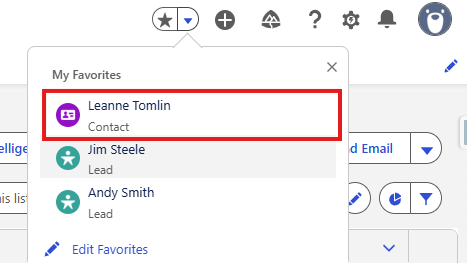
We have also created three ‘Favourites’ – sample Contact/Lead records – so you can quickly access representative examples. These are accessed from the top-right of the screen in the dropdown next to the favourites star.  

Record Pages

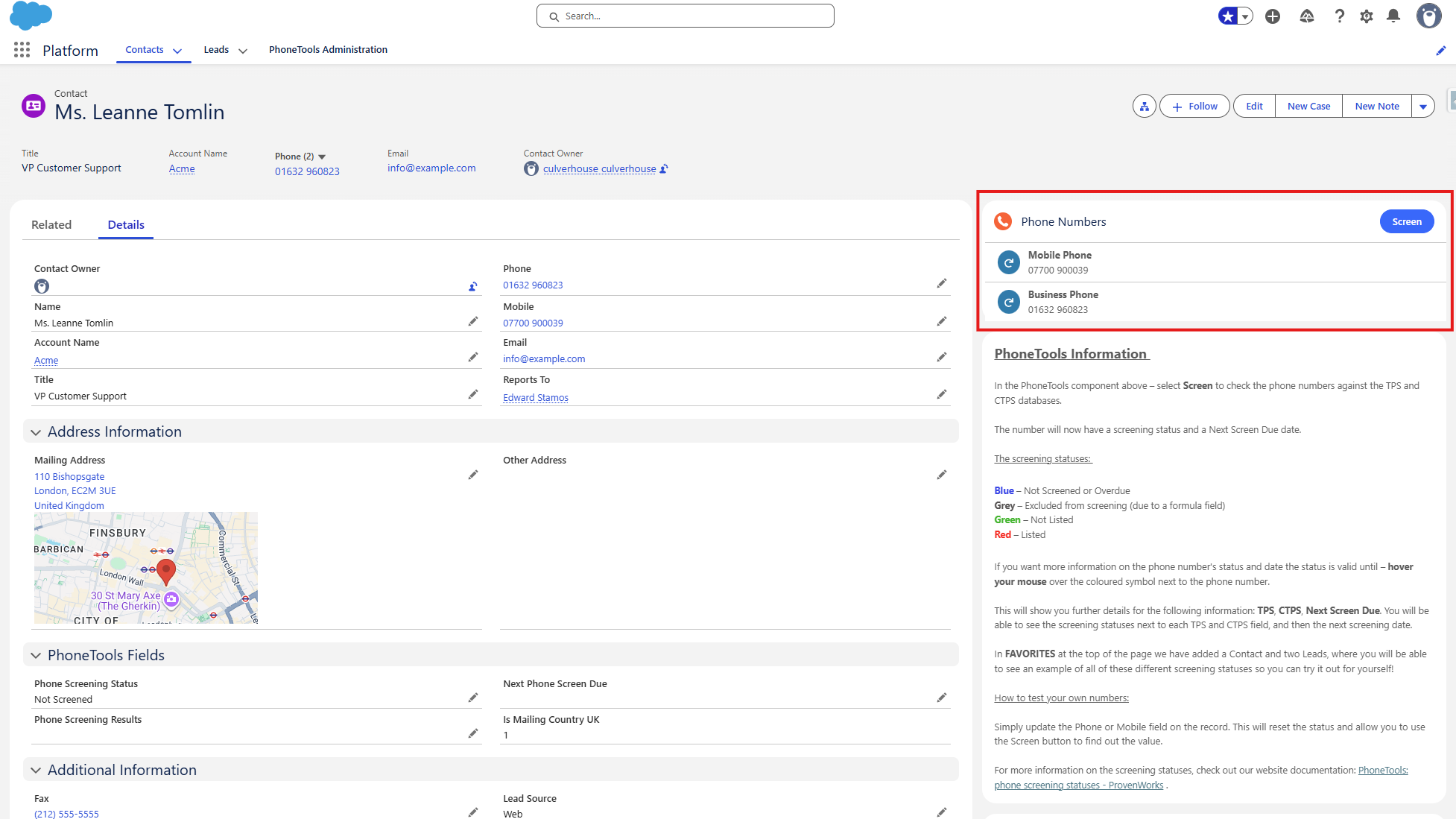
When you open a Contact or Lead record, you’ll find the PhoneTools Lightning component in the top-right of the page.

Below the PhoneTools component are two information blocks that explain: 

  • How the PhoneTools component works, 
  • How the formula field is used to determine whether the record should be screened. 

The PhoneTools features are outlined in these information blocks, but if you would like an in-depth explanation take a look at the PhoneTools Features in your Trialforce org article.

PhoneTools Administration Tab

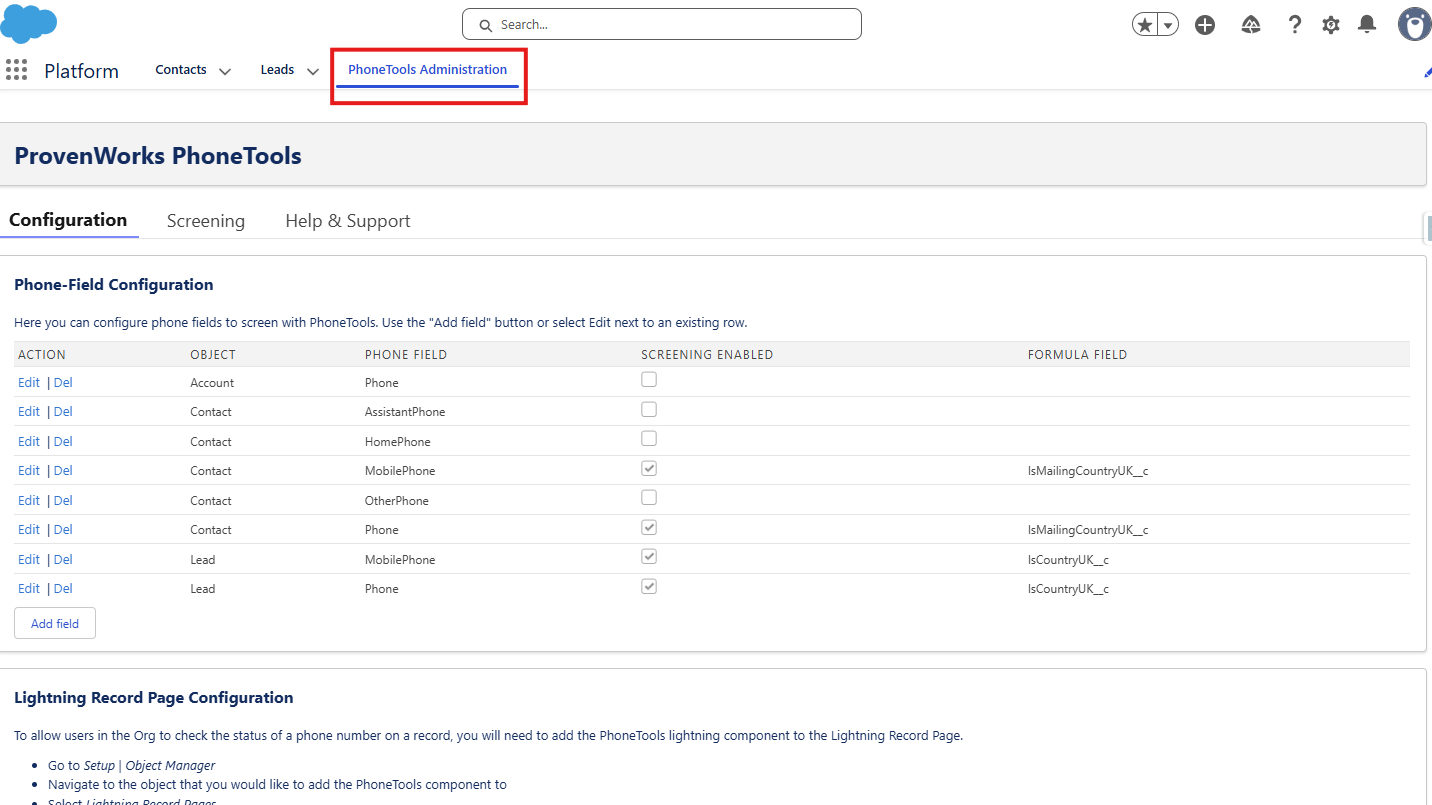
The PhoneTools Administration tab takes you to a Configuration sub-tab. You can see all the objects and fields where PhoneTools screening is enabled. There is also a reference to a custom formula field which provides exclusion from screening for records that meet given criterion.

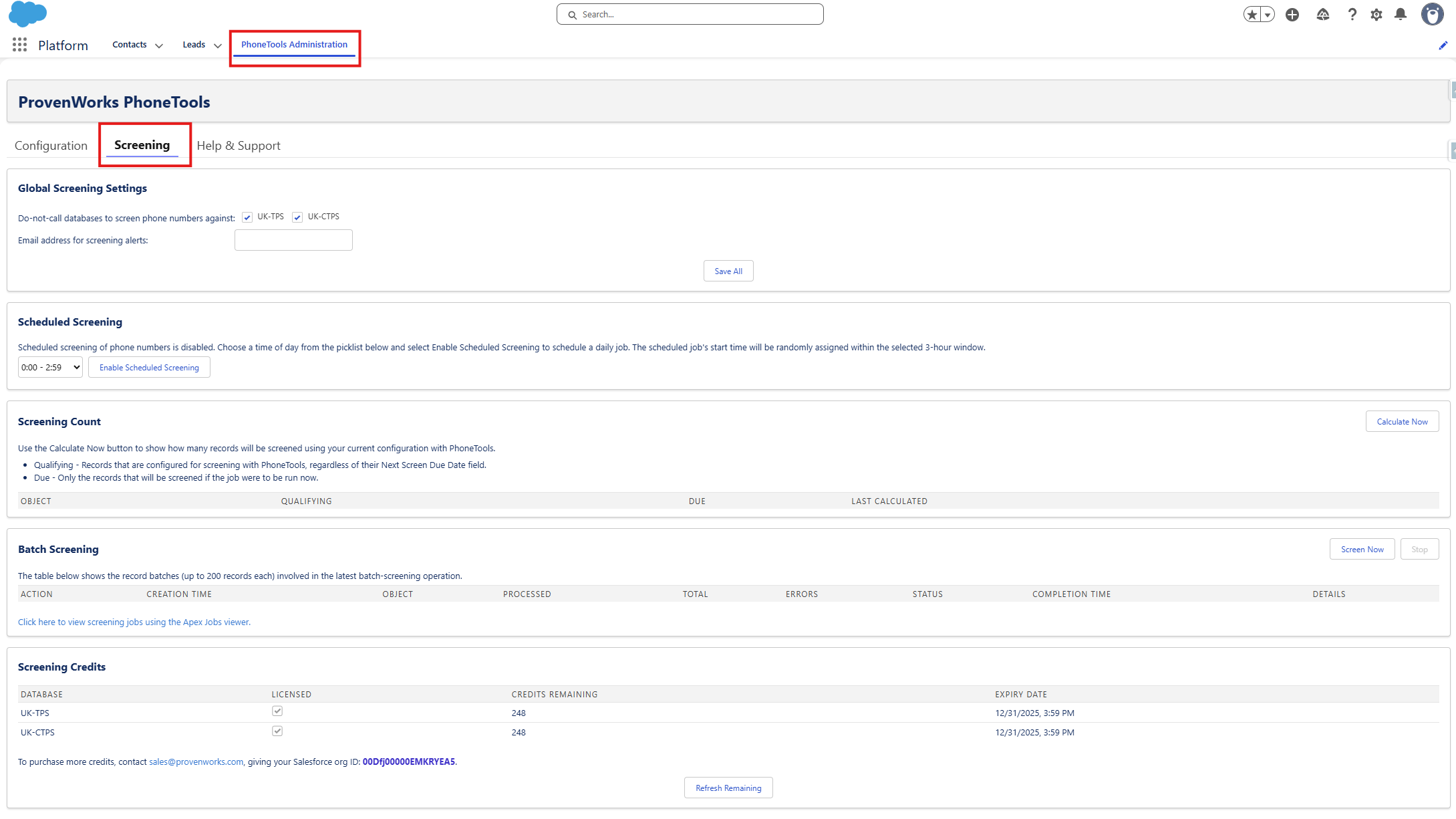
There is also a Screening page (found along the top options) where you can set up scheduled or batch phone number screening jobs, along with viewing screening settings and credits.

Finally, there is a Help & Support page with links and FAQs. 

What to do in your org

For some introduction tasks to get you acquainted with PhoneTools look at the Tasks to complete on your PhoneTools Trialforce org article. This will guide you through some of the basic features of PhoneTools using the preconfigured Trialforce org – looking at screening records, formula fields and batch screening processes. 

We hope you enjoy exploring PhoneTools and it gives you a clear understanding of how it will help you maintain compliance and manage your phone-based outreach safely and efficiently. If you have any questions or would like further guidance, our team is here to help. 

Tasks to complete in your PhoneTools Trialforce org

Now you have installed the PhoneTools Trialforce org, have a go at the following tasks to get to know the product using our preconfigured data. 

If you haven’t already, get more information on the setup of your Trialforce org by reading the Introduction to your PhoneTools Trialforce org article.

Task 1: Test the screening on record pages 

For this task find and click the Contact Leanne Tomlin from the favourites bookmark in the top right corner of the screen. 

In the PhoneTools Lightning Component located in the top right of the record page you can see the screening status for both Mobile and Business Phone numbers. 

For more information on screening statuses, take a look at PhoneTools features in your Trialforce org.

  • Hover over the blue icons to see the current screening status. 
  • Press Screen in top right corner of the component to screen both numbers. 
  • Now hover over the icons again to see the new screening results. 

You will see that the Mobile Phone number is ‘Not Listed’ on either TPS or CTPS databases so is safe to call. The Business Phone number is marked as ‘Listed’, and by hovering the mouse you can see it is not listed on the TPS database but it is listed on the CTPS database. 

Now try this out for the Lead Jim Steele, which can also be found under the favourites bookmark.  

  • Repeat the previous steps on the Phone number: look at the screening status, press Screen, then look at the new screening status. 

You will see that this number is marked as ‘Listed’, where it is found on the TPS database but not the CTPS. 

  • Edit the record by changing the phone number to 07700 900123. 
  • Notice what changing the number has done to the screening status. 
  • Now click Screen on the record and check the new status. 

Adding or updating a number will automatically reset the screening status to ‘Not Screened’ so it will need to be screened again. 

Task 2: Testing the formula field 

Details on the formula field used in the Trialforce org can be found in the “PhoneTools Formula Field” information block along the right side of the record page. 

For this task, find and click the Lead Andy Smith in the favourites bookmark. 

  • Notice the screening status for this Phone number is Excluded from screening and hover over the icon to see a Next Screen Due field is not relevant in this case. 
  • What happens when you press Screen

You will notice that the component will not screen numbers which are excluded so the status will remain unchanged. 

The Phone number in Andy Smith’s record is excluded because of the formula field placed on the Lead Phone in this org.

For the purpose of seeing how a formula field works, we are going to change this Lead to comply with the PhoneTools formula conditions in place:

  • Edit the Lead Address Country to United Kingdom. 
  • See how the screening status has changed. 
  • Now press Screen and look at the new screening status.

After Screening, the Phone number is shown as ‘Not Listed’ (this makes sense as is not a UK number), the formula had saved an unnecessary screening of a non-UK number which would not have been on the TPS or CTPS databases. 

Task 3: Batch phone screening 

For this task you will have a brief look at how batch phone screening can be implemented, and test this on the Contact and Lead phone numbers preconfigured in the org. 

  • Go to the PhoneTools Administration tab.
  • Select the Screening tab along the top of the page. 

In a production org when you want to automate screening of numbers – you can set up a ‘Scheduled Screening’ which will process all ‘Not Screened’ or ‘Due for Screening’ numbers at a daily time. 

For now we will test an immediate batch job – useful if lots of new numbers have been added to your org at once. 

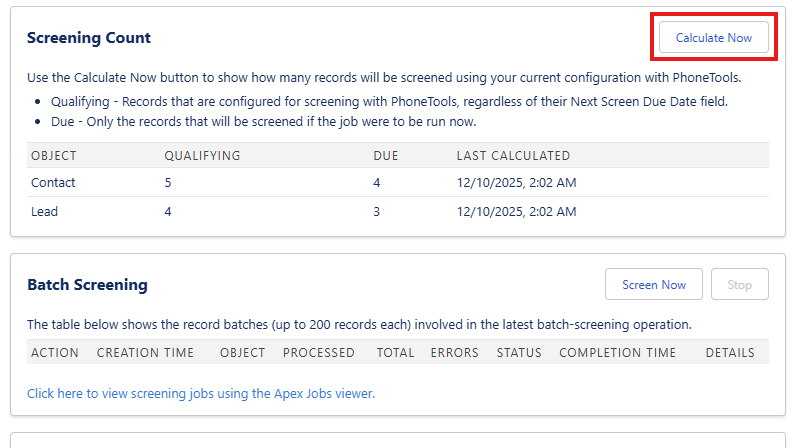
  • It is good practice to check the count first to see how many numbers are due for screening: press Calculate Now next to Screening Count. 
  • The Screening Count now shows you each object with the relative Qualifying numbers and Due numbers. 

The Due number indicates how many numbers would be processed if a batch screening job was run.  

You will notice that the Due number is lower than the Qualifying, this is because you have already screened some numbers in the org, so they do not need to be screened again until 21 days have passed. 

To start the batch job and screen all the Due phone numbers:

  • Next to Batch Screening select Screen Now 
  • This will show you the Object and related Processed jobs in real time throughout the batch job, ending with the Total job count and showing any errors and further details. 

At the end you will see that credits remaining, shown at the bottom of the page, has decreased from the original 250.  

Look through the Contact and Lead tabs to see the new screening statuses of all the records. Where the record still says ‘Not Screened’, view it to check that specific Contact/Lead is excluded from screening by the formula field. 

Note: for easy viewing select List View in the top right and then choose “{Object} for PhoneTools Testing” and pin this list – as this includes the Phone Screening Status in the list view.

For further exploration of the tool, feel free to add your own Contacts or Leads and play around with all of the features. 

Ensuring Data Accuracy and Compliance: How AddressTools Supports UK Higher Education Institutions 

The Importance of Accurate Data in Higher Education 

In the realm of UK Higher Education Institutions (HEIs), maintaining precise and reliable data is not just a matter of operational efficiency but a statutory obligation. The Higher Education Statistics Agency (HESA) mandates that HEIs submit comprehensive and accurate data annually, encompassing student demographics, course details, and contact information. Ensuring the accuracy of this data is paramount, as discrepancies can lead to non-compliance, financial penalties, and a tarnished institutional reputation. 

Understanding HESA Reporting Requirements 

HESA serves as the central body responsible for collecting and analysing data about higher education in the UK. HEIs are required to provide detailed information, including: 

  • Student Personal Details: Names, dates of birth, and contact addresses.
  • Course Information: Enrolment figures, course durations, and qualifications awarded.
  • Staff Data: Employment details, roles, and remuneration. 

Accurate address data is a critical component of these submissions, influencing funding allocations, policy decisions, and institutional benchmarking. Errors in address information can lead to misdirected communications, flawed statistical analyses, and potential non-compliance with statutory obligations. HEIs must adhere to HESA’s Data Collection Standards to ensure consistency and accuracy in reporting. 

Challenges in Maintaining Accurate Address Data 

HEIs often grapple with several challenges related to address data management:

  1. Data Entry Errors: A study revealed that approximately 17% of student addresses submitted by a Higher Education institution were incorrect, underscoring the prevalence of manual input errors. (AFD Software
  1. Inconsistent Formatting: The absence of standardised address input protocols can lead to inconsistencies, complicating data integration and reporting. 
  1. Dynamic Student Populations: Data indicates that nearly 60% of full-time students registered with a General Practitioner (GP) remain listed at their family addresses, despite residing elsewhere during their studies. (Office for National Statistics

Addressing these challenges is essential to uphold data integrity and ensure compliance with HESA reporting requirements and other statutory obligations. 

Introducing AddressTools: A Solution for HEIs 

ProvenWorks’ AddressTools is a comprehensive solution designed to enhance address data quality within Salesforce, offering features that directly address the challenges faced by HEIs: 

1. Real-Time Address Verification 

AddressTools verifies addresses at the point of entry, ensuring that only accurate and complete information is recorded. This proactive approach minimises the risk of errors propagating through institutional systems.

2. Standardisation of Address Formats 

The tool enforces consistent address formatting across all records, aligning with postal standards and facilitating seamless data integration and reporting.

3. Integration with Salesforce Education Data Architecture (EDA) 

AddressTools seamlessly integrates with Salesforce’s EDA, enabling HEIs to manage address data effectively within their existing CRM workflows. This integration supports the unique data modelling requirements of educational institutions.

4. Compliance Support 

By maintaining accurate and standardised address data, AddressTools aids HEIs in meeting HESA’s stringent data submission standards, thereby ensuring compliance and reducing the risk of penalties. 

Enhancing Data Quality at the University of Alabama at Birmingham 

The University of Alabama at Birmingham implemented AddressTools to improve their address data management. While this HEI is not a UK one, it is facing similar challenges and looks for ways to reduce friction when students submit or update their addresses. One notable feature is the type-ahead functionality, which suggests verified addresses as users type, reducing input errors and ensuring data accuracy. Evan Thrailkill, Director of Digital Strategy, highlighted this benefit:

“One of my favourite features is that when you start typing your address, it actually starts to populate prefilled addresses… and it would show that it’s verified.”

Empowering HEIs with Accurate Data 

Accurate address data is a cornerstone of effective higher education administration, influencing everything from student communications to statutory reporting.

AddressTools offers a robust solution for HEIs, ensuring data accuracy, facilitating compliance with HESA requirements, and enhancing overall institutional efficiency.

By integrating AddressTools into their data management processes, UK HEIs can confidently navigate the complexities of data submission and focus on their core mission of delivering exceptional education. 


AddressTools for Higher Ed

Salesforce’s Education Data Architecture (EDA) and the Education Cloud are invaluable tools to help you meet your goals. However, your institution is only as good as the data that powers it… which is where we come in.

Got questions? Chat to us!

Do you want to learn more about how AddressTools could be a great addition to your college or university Salesforce org? We’d love to chat! Use the scheduler to book a free call with our team and start your journey to better address data.

Can’t find a time that works for you or would rather email first? Fill out our contact form and we’ll get back to you as soon as we can.

CAFOD achieves data accuracy with AddressTools

“AddressTools is a great product for UK address data and many other countries too, with solid day-to-day support and development that keeps pace with Salesforce innovation.”

— Jonathan Spink, Salesforce Developer, CAFOD 

CAFOD stays mission-focused with clean Salesforce data

CAFOD is an international development charity who reach out to people living in poverty with practical help, whatever their religion or culture. CAFOD is the official aid agency of the Catholic Church in England and Wales and part of Caritas International.

With a multi-cloud Salesforce implementation in place, CAFOD needed to make sure that incoming data was clean so that it could be used effectively and efficiently for various processes including outbound mailing.

CAFOD had data goals for their Salesforce CRM

Like with many organizations, CAFOD needed quality address data to succeed in their wider processes. They needed a solution that was easy to use and reasonably priced against similar options for their volume of queries.

Successful mailing

CAFOD needed to have reliable address data for the UK and a variety of other countries to ensure that mailing was delivered to stakeholders.

A single source of data

They wanted to create a positive experience for their Salesforce users who were inputting new address data. CAFOD wanted a tool that was easy to use that would empower users to clean up address data at the point of entry, giving them a Salesforce org with data they could trust.

Clean underlying data for other tools

Good address data would also mean an easier ability to cross-reference other datasets that give contextual information on a district or locality.

A fast time to value

“In terms of training users, they were up and running straight away.”

— Jonathan Spink, Salesforce Developer, CAFOD 

Once installed, AddressTools provides a Lightning component that can be placed on any Lightning page, with a one-click ‘Verify’ button for users to check the address against postal authority data e.g. Royal Mail for UK addresses. If there is any ambiguity during the address search, AddressTools lists all possible verified options for users to choose from.

As an end user, they might not even realize they’re using another tool thanks to its Salesforce-native interface!

Running operations with clean address data

“AddressTools tackles CAFOD’s specific challenges by providing an easy-to-use interface and datasets.”

— Jonathan Spink, Salesforce Developer, CAFOD

With AddressTools implemented in their Salesforce org, CAFOD users can verify addresses against local postal authority data from around the world e.g. USPS for USA and Deutsche Post for Germany, all directly in Salesforce on the record!

Not only does CAFOD have a straightforward user experience to input accurate data, but they can have confidence that mailings will reach their supporters around the world.

Even more fundamentally, CAFOD has a strong data backbone in Salesforce that they can trust, meaning they can leverage the full power of their multi-cloud Salesforce implementation as well as other integrations and data sets. It all starts with good data!

Why CAFOD recommends ProvenWorks

Jonathan shares his experience of working with the ProvenWorks team and using AddressTools:

“The ProvenWorks team is always helpful and responsive. AddressTools is a great product for UK address data and many other countries too, with solid day-to-day support and development that keeps pace with Salesforce innovation.”

Discover the power of AddressTools

AddressTools is an award-winning package for Salesforce that helps you standardize, validate, and verify your address data. Book a demo to see AddressTools in action with our team.

Got questions? Chat to us!


Can’t find a time that works for you or would rather email first? Fill out our contact form and we’ll get back to you as soon as we can.

Address Data Fraud: Why Mismatched ZIP Codes Are a Red Flag

Introduction: The Hidden Cost of Inaccurate Address Data

Fraud is on the rise, with online scams becoming increasingly sophisticated. One overlooked form of fraud involves providing incorrect or fake addresses when submitting contact details. For businesses, this can result in missed deliveries, wasted resources, and compromised customer trust.

If your company relies on address data – whether for deliveries, customer verification, taxation or regulatory compliance – you need to be confident that the addresses you receive are valid. Inaccurate or fake address submissions can harm your bottom line and open the door to fraud. Fortunately, real-time address verification can help.

In this post, we’ll explore address data fraud, how fraudsters manipulate address data, and how ProvenWorks’ AddressTools can help U.S. businesses stay one step ahead.

What Is Address Data Fraud?

Address data fraud occurs when a person provides false, incomplete, or manipulated address information to deceive a business. This can happen during online transactions, account sign-ups, or any form submission that requires an address. The goal is often to bypass validation checks, avoid detection, or exploit system weaknesses for fraudulent purposes.

One common tactic involves mismatched ZIP codes and street addresses. For example, a fraudster may enter a legitimate ZIP code but pair it with a street address that doesn’t exist in that area to trick basic address validation systems. Why? To:

  • Make stolen credit card purchases without triggering address verification systems.
  • Bypass geographic restrictions, such as country-specific product availability or shipping rules.
  • Avoid fraud detection systems that rely on matching a billing address to a payment method.

Another tactic involves entering an incorrect country or state to access services or pricing not available in their actual location. For instance, a fraudster might select “United States” on a form to unlock shipping options or promotions reserved for U.S. customers, while providing a non-U.S. address.

Common Examples of Address Data Fraud:

  1. Fake addresses: Fraudsters use non-existent or random addresses to avoid detection.
  2. Mismatched ZIP codes: A valid ZIP code paired with an incorrect street address to make it harder to verify.
  3. Incomplete addresses: Missing key components (like apartment numbers) to delay delivery or verification.

Why U.S. Businesses Need to Worry About Address Data Fraud

For U.S.-based businesses, inaccurate address data can have serious implications. Beyond the immediate cost of failed deliveries, incorrect addresses can lead to regulatory issues, damaged brand reputation, and reduced operational efficiency.

According to USPS, 15% of addresses entered online contain errors, which can lead to billions in lost revenue annually. The rise of e-commerce and remote transactions has made address validation more critical than ever.

Here’s how address data fraud impacts businesses:

The Risks of Inaccurate Address Data:

  • Lost revenue: Deliveries that can’t be completed due to incorrect addresses lead to wasted shipping costs.
  • Fraudulent transactions: Fraudsters use fake addresses to carry out scams.
  • Regulatory non-compliance: Certain industries require accurate address data for compliance purposes.
  • Damaged customer trust: Failed deliveries and incorrect data can harm your brand’s reputation.

How Address Verification Helps Prevent Fraud

The good news? Address verification at the point of entry can prevent fraudulent address submissions before they cause damage. By verifying that an address is real, complete, and accurately matches the ZIP code, businesses can reduce fraud risk and improve data quality.

The Key to Address Verification: Real-Time Detection

Real-time address verification ensures that addresses are checked as they are entered, preventing fraudulent or incorrect submissions from making it into your database. This proactive approach stops bad data at the source, reducing the need for costly cleanup later.

How AddressTools by ProvenWorks Can Help

For Salesforce users, ProvenWorks’ AddressTools is a powerful solution to ensure address accuracy and prevent address data fraud.

AddressTools provides:

1. Real-Time Address Verification

Addresses are verified as they are entered, ensuring they are real and match the ZIP code. The tool checks against trusted CASS™ certified datasets to mitigate incorrect or fraudulent entries.

2. Type-Ahead Address Suggestions

When users enter incomplete or incorrect addresses, AddressTools provides suggested corrections. This helps reduce manual errors and ensures that your database remains accurate and complete.

3. Standardized Address Data

AddressTools standardizes addresses to ensure consistency across your Salesforce instance. This improves reporting accuracy and makes it easier to comply with regulations.

4. Address Data Enrichment

AddressTools can auto-populate additional data points for the address, for example time zone, sales territory or U.S. county, which can be then utilized in other parts of the business logic.

5. Seamless Integration with Salesforce

AddressTools integrates directly into your existing Salesforce workflows, providing a user-friendly experience without disrupting operations.

Why Accurate Address Data Matters for U.S. Businesses

Accurate address data isn’t just about reducing fraud – it’s also about improving operational efficiency and customer satisfaction.

Here’s why:

1. Improved Operational Efficiency

Accurate address data means fewer failed deliveries, fewer returned packages, and fewer manual data corrections. This saves your business both time and money.

2. Enhanced Customer Trust

When deliveries arrive on time and at the correct address, customers are more likely to trust your business. Building trust leads to repeat business and positive word-of-mouth.

3. Regulatory Compliance

For industries like finance and healthcare, maintaining accurate address data is essential for regulatory compliance. AddressTools helps businesses avoid penalties and stay compliant with legal requirements.

Conclusion: Protect Your Business with ProvenWorks’ AddressTools

Address data fraud is a growing concern for U.S. businesses. Mismatched ZIP codes and fake addresses can lead to financial losses, missed deliveries, and damage to your brand’s reputation.

With real-time address verification from ProvenWorks’ AddressTools, you can prevent fraudulent address submissions, improve data accuracy, and enhance your business operations.

Want to see how AddressTools can work for your business?


AssuredPartners Aerospace elevates their address data accuracy with AddressTools

“AddressTools is a no brainer decision. First of all, the solution just works. It is simple to use. And the Customer Service and Support is excellent. I can’t recommend this product enough.”

— Rusty Wissmiller, SVP – Aerospace Operations at AssuredPartners Aerospace

Transforming address data for a leading aviation broker 

AssuredPartners Aerospace, the largest General Aviation Broker in the United States, provides insurance solutions across the entire aviation ecosystem, excluding airlines. Headquartered in Colorado, AssuredPartners Aerospace has been on a mission to streamline their operations and improve their CRM data accuracy.

The challenge: ensuring accurate address data

AssuredPartners Aerospace faced significant issues with incorrect and incomplete address data in their Salesforce CRM. During a mass mailing campaign, it took four hours to clean up the address information, highlighting the need for a more efficient solution to verify addresses before they were entered into the system.

The solution: implementing AddressTools for instant address verification

It was crucial for AssuredPartners Aerospace to find a tool that seamlessly worked in Salesforce OmniScript as well as their standard Account entry. For them, AddressTools was the comprehensive solution that would not only verify addresses against the USPS database but also offer prefill functionality for their users and customers at point of entry.

Effortless integration and minimal training

Integrating AddressTools into their Salesforce environment was a straightforward process. The solution’s intuitive design meant that users required virtually no training. AddressTools suggests only verified addresses to users and automatically corrects and standardises the address fields upon address selection, significantly reducing manual entry errors.

Immediate impact and tangible results

“A big win for our company.”

— Rusty Wissmiller, SVP – Aerospace Operations at AssuredPartners Aerospace

AddressTools has delivered substantial improvements for AssuredPartners Aerospace:

  • Time savings: The time-consuming task of cleaning up address data for mailings has been eliminated, thanks to AddressTools’ verification at point of entry to Salesforce.
  • Enhanced data quality: AddressTools ensures that every address entered is a verified, deliverable address, sourcing data from the USPS as well as global postal authorities. The solution also enabled them to clean up all their existing addresses in their Salesforce org in one batch cleanse. This provides AssuredPartners Aerospace with reliable data for mailing, reporting and assignment processes moving forwards.
  • Operational efficiency: AssuredPartners Aerospace manages a large volume of online traffic, including four key address collection areas. AddressTools streamlines data entry for clients in particular, reducing human error and data entry time.

Why AssuredPartners Aerospace recommends ProvenWorks

“ProvenWorks support has been fantastic. They are very responsive and have been able to easily solve our problems so we can move forward.”

— Rusty Wissmiller, SVP – Aerospace Operations at AssuredPartners Aerospace

AssuredPartners Aerospace has experienced exceptional support from the ProvenWorks team. The responsiveness and effectiveness of ProvenWorks’ customer service have been pivotal in their decision to integrate AddressTools into their new Salesforce project.

Discover the power of AddressTools

AddressTools is an award-winning package for Salesforce that helps you standardise, validate, and verify your address data. Book a demo to see AddressTools in action with our team.

Got questions? Chat to us!


Can’t find a time that works for you or would rather email first? Fill out our contact form and we’ll get back to you as soon as we can.

PhoneTools 3.0 Status Changes

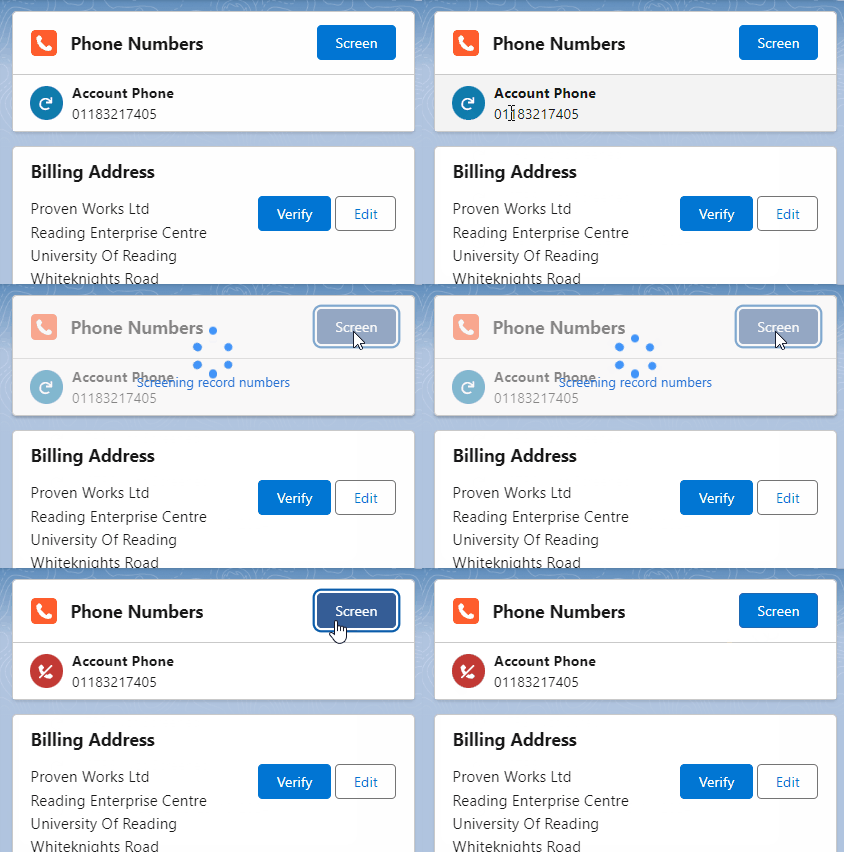
With the release of PhoneTools 3.0 comes changes to the PhoneTools status icons and colours. This change removes ambiguities and provides additional clarity at a glance. 

Not listed  

The ‘Not listed’ status indicates: 

  • The number has been screened and does not exist on the databases screened against.  
  • The Next Screen Due date in the future. 

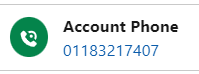
Changes: The status has changed from a tick on a green background to a phone icon on a green background. 

Listed

The ‘Listed’ status indicates: 

  • The number has been screened and exists on a database screened against.
  • The Next Screen Due date in the future. 

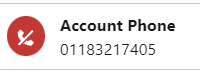
Changes: The status has changed from a cross on a red background to a phone with a strikethrough icon on a red background. 

Not yet screened or overdue 

The ‘Not yet screened or overdue’ status indicates:  

  • The Next Screen Due date is in the past, or empty. 
  • The record needs screening to provide a valid result. 

Changes: ‘Not yet screened’, previously represented by a question mark on an amber background, and ‘Overdue’, previously represented by a clock on an amber background, have now been changed to a refresh icon on a blue background. These statuses have been merged because as the action for the user is the same (i.e. submit the record for screening to provide a valid result). 

Error 

The ‘Error’ status indicates: 

  • There was an issue with the number (i.e. a bad number), or an issue with the screening job (i.e. the org has run out of screening lookup). 
  • The issue needs to be resolved to provide a valid result. 

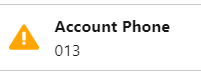
Changes: The status has changed from a cross on a red background to an exclamation mark on a yellow background. 

Excluded from Screening

The ‘Excluded from screening’ (formerly ‘Not required’)status indicates: 

  • The org is configured with a formula rule for establishing whether the record should be screened. The status indicates that the record does not meet the requirements for screening.

Changes: The icon has remained the same however the prompt text has changed from ‘Not required’ to ‘Excluded from screening’.

To learn more about what’s new in PhoneTools 3.0, please refer to: Link

How to upgrade 

Upgrade to PhoneTools 3.0 now! 

Simply install the latest package from the Salesforce AppExchange to access these latest features. 

Start using PhoneTools for free 

If you aren’t using PhoneTools already, you can get started with all the latest features for free! Screen your phone numbers on up to 250 records each month against the TPS and CTPS lists at no cost. 

Introducing PhoneTools 3.0: improved UI, new traffic light icons and smoother setup

Please note: To leverage the new features, your org must have PhoneTools installed from the Salesforce AppExchange. 

We’re always striving to improve our solutions for you, and we’re excited to bring you a new release. Introducing PhoneTools 3.0!  We have been hard at work enhancing the solution with additional functionality to improve your user experience and up your phone number screening game against the Telephone Preference Service (TPS) and Corporate Telephone Preference Service (CTPS).   

Here are the key updates that we will cover in this article: 

  • Introducing new traffic light colours and icons: enhancing status clarity 
  • Improved UI: sleeker design and enhanced functionality   
  • Quality of life enhancements: smoother setup and user experience   
  • Release notes  
  • How to upgrade 

Let’s dive in! 

Introducing new traffic light colours and icons: enhancing status clarity 

  • Updated traffic light icons to reflect a clearer status for each phone number 
  • Introduction of new status indicators to streamline understanding 
  • Revised existing icons to eliminate ambiguity and reduce the need for additional actions 

Benefit: Greater transparency and efficiency 

The overhaul of traffic light icons in PhoneTools 3.0 offers a more intuitive way to assess the status of phone numbers at a glance. By clarifying and updating these icons, users can now quickly and accurately understand each number’s status without needing extra steps, leading to more efficient workflows. 

To see the full list of changes in the icon statuses and their meaning, please refer to: Link

Improved UI: sleeker design and enhanced functionality 

  • Updated header and card design on the PhoneTools component for a more coherent appearance
  • “Screen Phone Numbers” button relocated to the header of the component and renamed to “Screen”
  • Next Screen Due date format now aligns with user’s locale settings for consistency 
  • Introduction of telephone hyperlinks for screened numbers not in databases,  allowing desktop diallers to quickly dial from their desktop applications and speed up their outbound processes 

Benefit: Enhanced visual appeal and increased efficiency 

The recent updates to PhoneTools deliver a more polished and cohesive design, making the interface visually appealing and easier to navigate. By aligning date formats with user locales and introducing telephone hyperlinks, we’ve streamlined the process for outbound calls, enabling faster and more efficient communication. 

Quality of life enhancements: smoother setup and user experience

  • Retirement of legacy features to simplify setup and reduce complexity 
  • Minor improvements to the administration page for easier navigation 

Benefit: Streamlined setup and improved intuitiveness for users 

The latest release brings significant quality of life enhancements to PhoneTools. By removing outdated features and improving the administration page, we’ve simplified the setup process, making it easier for new users to get started. These changes reduce obstacles and streamline system management, resulting in a hassle-free experience for all users. 

Release notes 

To see the full list of enhancements and improvements, please refer to the Release Note.

How to upgrade 

Upgrade to PhoneTools 3.0 now! 

Before upgrading to version 3.0, you will be required to install version 2.10 [Bridge]. You can find the relevent installation links next to the version in the release history.

Once version 2.10 [Bridge] is installed, simply install the latest package from the Salesforce AppExchange to access these latest features. 

Start using PhoneTools for free

If you aren’t using PhoneTools already, you can get started with all the latest features for free! Screen your phone numbers on up to 250 records each month against the TPS and CTPS lists at no cost. 


How to cold call at scale, compliantly

This cold calling series is written in partnership between ProvenWorks and RocketPhone.Ai

This article is not intended as legal advice. This is guidance that discusses specific tools which, when used correctly, can form part of a solution to ensure compliance. For legal advice, consult a qualified legal practitioner. 

Cold calling remains a powerful tool for sales teams to connect with potential customers but scaling up this strategy while ensuring compliance with regulations can be a daunting task. Fortunately, for Salesforce users, navigating these complexities is made easier with a range of tools available on AppExchange. In this final part of the series, we’ll explore some of the must-have tools to help you make cold calls through Salesforce in a compliant way, ensuring both effectiveness and adherence to regulations. 

Salesforce ISVs and compliance

The Salesforce AppExchange is a thriving marketplace offering a diverse range of solutions designed to enhance the functionality and capabilities of Salesforce. What makes AppExchange particularly valuable is its vast selection of products tailored to niche requirements, such as compliance. Whether you’re looking for solutions to streamline TPS and CTPS screening or sophisticated AI-powered tools to ensure GDPR and FCA compliance, AppExchange provides a curated selection of trusted solutions to meet your unique needs.  

PhoneTools: TPS and CTPS screening in Salesforce

Our first solution is, PhoneTools by ProvenWorks, a native solution for Salesforce that enables you to automatically and manually screen phone numbers against the Telephone Preference Service (TPS) and the Corporate Telephone Preference Service (CTPS).  

PhoneTools provides instant feedback within Salesforce, letting sales reps know if a number is safe to call. To streamline your workflow, schedule automatic screening or use a formula field to target only numbers requiring checks. Plus, it’s completely free if you are screening less than 250 records a month.

By automating this process, PhoneTools helps sales teams stay compliant with PECR regulations, minimising the risk of calling numbers registered on these preference lists. With PhoneTools, you can focus on making meaningful connections with prospects while ensuring regulatory compliance effortlessly. 

With PhoneTools 3.0, its latest release, it has introduced a refreshed user experience with sleeker design and enhanced functionality, including updated traffic light icons for clearer status indicators, a smoother setup process, and convenient telephone hyperlinks for faster dialling. This upgrade makes it easier than ever to manage compliance and enhance call workflows in Salesforce.

You can get started for free here

RocketPhone: Leading Salesforce CTI with compliance features

RocketPhone emerges as a leading Salesforce Computer Telephony Integration (CTI) solution, leveraging AI to optimise phone-based sales operations while ensuring compliance with regulations such as GDPR, Ofcom, and FCA. Beyond serving as a robust phone system for Salesforce, RocketPhone offers a suite of compliance tools to enhance your sales processes.  

Firstly, its AI bookmarking feature listens to conversations to detect marketing consent, automatically updating GDPR preferences in Salesforce and blocking calls to prospects marked as “do not call.”  

Secondly, RocketPhone employs smart progressive dialling to prevent breaches of Ofcom’s rules on silent calls.  

Lastly, its proprietary voice AI models can identify signs of vulnerability in conversations, alerting agents to avoid inadvertently mis-selling and ensuring compliance with FCA consumer duty regulations. 

You can get started with a demo

Call scripts: Ensure phone compliance with Salesforce’s native scripting tool

Sales Engagement (formerly known as High Velocity Sales) in Salesforce offers call scripts as a powerful feature designed to help cold callers follow a predetermined and compliant script. These call scripts provide sales representatives with structured guidance and prompts during customer interactions, ensuring consistency, efficiency, and compliance.  

Call scripts ensure that sales reps deliver consistent and accurate information to customers, minimising the risk of inadvertently providing misleading or incorrect details that could lead to compliance issues. Scripts can be built to include specific language and disclosures required by regulatory bodies such as GDPR, FCC, or FCA.  

With the right tools at your disposal, cold calling at a scale through Salesforce can be both an effective and compliant strategy. By leveraging the power of the Salesforce and integrating solutions like PhoneTools and RocketPhone, you can ensure your sales team stays on the right side of regulations while maximising their outreach and building valuable connections with potential customers. 

This concludes our cold calling series, covering why cold calling is essential for your business strategy, how to remain compliant when calling in the UK and finally scaling your business with cold calling. We hope you enjoyed the series and will utilise the knowledge provided to improve your cold calling strategy. 

Ready to start your research to optimise your cold calling processes? Check out our 5 tips for choosing a solution on the Salesforce AppExchange