If the country value doesn’t standardize, it’s usually because the AddressTools trigger isn’t running on that object or standardization isn’t enabled for the package or address block.
How to fix it?
- Enable the trigger for your object.
- Turn on standardization and choose your country format.
- Turn on Standardize Country for the specific address block.
Step-by-step resolution guide:
1. Make sure the AddressTools trigger is on for your object.
- Go to AddressTools Administration | Settings | Trigger Settings.
- Ensure the trigger is enabled for your object.
- For custom objects see: Trigger creation and enablement guide.

2. Turn on standardization and choose the country format.
- Go to AddressTools Administration | Settings.
- In Feature Enablement, select Standardization Enabled.
- Set Country Standardization Format to Name (or other choice) and save.

3. Enable standardization on the address block.
- Go to AddressTools Administration | Address Blocks.
- Click Edit next to the relevant object’s address block.
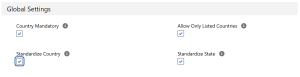
- In Global Settings, check Standardize Country and save.
If you are still experiencing issues and need assistance, contact support@provenworks.com.