Blog

Import data via a Digital Experience with Experience Cloud

Use of Digital Experiences (previously known as Communities) have been growing in popularity since their launch, with even more adoption since the repositioning of Salesforce Experience Cloud.

Salesforce Experience Cloud implementations have been expanding with use cases growing where external users need to interact with an internal CRM. Some of these use cases even include importing data – this is where we come in!

A digital experience can be used in so many contexts: partner portals, e-commerce sites, or even franchisee hubs. With lots of different audiences come lots of reasons why users need to import data.

Empower external users to import

One of our favourite use cases to date has involved importing annual employment diversity data of over 40,000 registered businesses based within an allocated region. Each entity was already using a spreadsheet to collect all the required data, but it was previously left to a single admin to manually import all the data that was received via email across a one-month period.

With the aim to cut out the middleperson, they worked with Salesforce and ProvenWorks to roll out a new Digital Experience which had SimpleImport’s ManagedImport component as a way of importing all the data into Salesforce.

With the component in place on the Digital Experience and the import mapping configured, the business entities could drag and drop their spreadsheets onto the component, importing the data themselves.

Immediate benefits of using SimpleImport

  • Emails are no longer being sent to the incorrect email address which potentially resulted in leaked data.
  • Internal teams can run reports in Salesforce to see which businesses were yet to import their data. Additionally, automated processes can then send notifications to the correct contacts.
  • Mistakes are highlighted to the businesses at point-of-entry, so they are able to correct any missing data.
  • The admin previously in charge of the process no longer has to download all email attachments and import their data.

SimpleImport acknowledges the user’s permissions, so the digital experience users only need write permissions to their custom object. There is no concern that they would be able to use SimpleImport to access data that they should not have access to.

What’s next?

Learn more, book a demo and get a trial of SimpleImport by ProvenWorks.

SimpleImport turns 10 years old! 🎈🎈🎈 

Our data import solution for Salesforce, SimpleImport, is a decade old and we’re getting emotional…

Just watch our 10 years of SimpleImport video:

We’re celebrating a special birthday… 🎂

This autumn we’re celebrating 10 years of SimpleImport. Yep, it’s been a whole decade since we released our exclusive-to-Salesforce, 5-star data importing solution.

But why does an import solution need a birthday? Because it’s not really about the solution. 

As ever, people are at the heart of everything we do. 

We’re celebrating 10 years of fantastic SimpleImport customers as well as the system integrators and Salesforce team we’ve met along the way. Not to mention the 10 years in which our own team has grown, building importing expertise on the Salesforce platform. 

So, we’re marking this milestone by having a little party. Don’t worry – we’re not leaving you out, you can get involved too. Keep your eyes on your inbox and LinkedIn for some 2012 nostalgia! 

Talking of 2012, let’s take a look back to see where ProvenWorks was 10 years ago…  

Where were we in 2012? 

ProvenWorks was created in 2008 at the kitchen table of our Managing Director, Joel Mansford in Reading, UK. Fully bootstrapped and independent, we built a native-to-Salesforce solution for cleaning up address data and became a Salesforce partner in 2009. 

Then, in 2012, we had an idea.

We noticed the need for a better, simpler data importing tool for Salesforce users. So, we wrote the app ourselves and SimpleImport was born.

As for Salesforce in 2012… Forbes selected Salesforce as the world’s most innovative company for the second consecutive year, a year in which Salesforce was celebrating its 100,000-strong customer base and establishing offices around the world. 

Now 10 years on, where are we and how far have we come? 

Where are we now? 

ProvenWorks hosts drinks at Salesforce Tower alongside GTM Guides, September 2022

SimpleImport has transformed, as Salesforce and the digital world have grown and changed. It now features a unique-on-the-market ManagedImport Lightning component for empowering users to import via a pre-configured drag and drop interface, as well as a new, more intuitive UI. And our development team never stops, with more features and updates being added to the roadmap constantly. 

More widely, we’ve come a long way as a company since we released SimpleImport in 2012. From hitting the $1 million dollar mark, to winning a Salesforce Partner Innovation Award and, most recently, to being accepted onto the Salesforce Grow Accelerate Programme. 

Nevertheless, some things have remained constant – we’re still completely bootstrapped and independent for a start. We still operate exclusively in the Salesforce ecosystem, and that’s where our expertise and passion is. And most importantly, we’re still committed to delivering gold standard customer success alongside each of our products. 

What’s left to say? 

10 years is a significant milestone in a fast-moving industry like software. We want to say thank you to everyone who we’ve worked with and alongside over the last 10 years for making SimpleImport and ProvenWorks what they are today. 

Happy Birthday SimpleImport! 

We look forward to celebrating with you all.  

🥳 Join the birthday party on LinkedIn #10yearsSimpleImport

Updating your solutions for Legacy API Retirement in Summer ‘22

What Legacy APIs are Salesforce retiring?

As part of their Summer ‘22 Release, Salesforce has announced the retirement of a number of legacy APIs.

Versions 7.0 through 20.0 of the Salesforce Platform SOAP, REST, and Bulk APIs will be deprecated and no longer supported as of the Summer ’22 release.

This means that these legacy APIs, and third-party integrations that rely on them, will cease to function after the release.

When are the Legacy APIs being retired?

Salesforce announced that June 10 and 11 2022 is the final release weekend when all remaining Salesforce instances are upgraded if they haven’t been already.

Legacy API Retirements and ProvenWorks solutions

To ensure that you do not encounter any issues with AddressTools, SimpleImport, IndustryComplete or PhoneTools, we recommend ensuring that your current version is or is later than the versions listed in this post. If you need advice on how to upgrade an AppExchange managed package, please see the resources linked at the end.

We have listed the version of each tool, including a link to its latest AppExchange listing, that you must be on in order to be using supported APIs.

AddressTools Premium:

7.75+

AddressTools Free:

6.20+

Address Verification Flow Component:

1.72+

SimpleImport Free:

2.47+

SimpleImport Premium:

2.57+

ManagedImport:

1.15+

PhoneTools:

2.0+

IndustryComplete:

2.16+

Resources

Prepare for Legacy API Retirement in Summer ’22 – Salesforce Developers’ Blog

Salesforce Platform API Versions 21.0 through 30.0 Retirement – Salesforce Help

Salesforce Summer ‘22 Release — Here’s What to Expect – Salesforce News

Salesforce Summer ’22 Release Notes

Don’t Miss These Key Dates: Summer ’22 Sandbox Preview

How to upgrade your ProvenWorks solution

We wrote a handy four-step guide to walk you through how to upgrade your AppExchange solutions.

Contact us

If you’re worried about how the API retirements might affect you and your ProvenWorks solution, please don’t hesitate to contact us.

Interview: Farm Credit Illinois transition to new software seamlessly with Impowr

“Impowr is used by our whole credit underwriting team multiple times a day.”

Jon Cook, Vice President – Credit Services Division at Farm Credit Illinois

Farm Credit Illinois is a farmer owned and directed agricultural lending cooperative serving 10,000 farm families, agribusinesses, and rural landowners in the southern 60 counties of Illinois with competitive and flexible financing and crop insurance expertise. Their deep understanding of agriculture enables them to provide knowledgeable and effective service.

An interview with Jon Cook, Vice President – Credit Services Division at Farm Credit Illinois

Jon Cook shares the challenges that Farm Credit Illinois faced when they moved to new loan origination software and how Impowr (formerly SimpleImport) was able to give them the seamless process they were looking for.

What specific challenges were you trying to solve that made you look for a solution?

Farm Credit Illinois (FCI) recently implemented the nCino suite for our loan origination platform. During our design and discovery phase, we realized we were going to have a gap in our credit underwriting process because our previous configuration for uploading financial data sets was not going to be compatible with nCino.

We needed to upload data sets from Excel to the loan origination system for risk rating and other company objectives. Along with our technology provider, Farm Credit Financial Partners, Inc. (FPI), we began the search to find a solution to fit our needs.

What were you (or weren’t you!) looking for in a solution?

  • A cost effective, secure, and efficient tool to import data from Excel into our nCino platform.
  • A solution that could be easily used by our Credit Department and fit seamlessly within the process without adding additional navigation or clicks.
  • We could not afford to sacrifice our member experience by negatively impacting turnaround time in our loan decisions or employee engagement with a complex or cumbersome solution.
  • We did not want a complex solution that would require more regular monitoring or resource demand for support, or leave us vulnerable to data errors in transition.

After a process of vetting different solutions, from internally built custom code to outside solutions, we found ProvenWorks. The solution Impowr fit our need to efficiently and effectively upload data from Excel to nCino.

How easy is it to use Impowr?

Very easy! Once we created and saved the import mapping, the end user experience was seamless! We have one saved mapping that is used by many users multiple times a day. It’s a key cog within our underwriting process of uploading data.

How long did it take to train your users?

We were able to coincide the implementation of Impowr with the go-live of our nCino platform. As a result, we incorporated the training for Impowr in our new guides which made for a seamless transition to Impowr. This tool was labelled a “win” in multiple training locations during training courses.

How does Impowr solve the challenges you had with your process?

At the drag and drop of an Excel file, we’re able to import data from our Excel model into the nCino loan product package in a seamless transition.

The efficiency gained from Impowr saves end users from manually entering these data points from point A to point B, reduces data integrity concerns at an effective cost and demands minimal resources to implement and maintain.

How has Impowr helped your business and customers?

The saved data mapping is used by our whole credit underwriting team multiple times a day. At FCI, we view Impowr as our end solution and feel it best fits into the process as we underwrite credit today. The results through two months are very valuable, as this tool in part helped our credit department underwrite a large Q4 loan demand. Without Impowr, this would have negatively impacted loan decision turnaround time with our members and our employee engagement.

Why Impowr?

We’ve had no reason to contact Support thus far – which is a good sign as we haven’t had any issues! I’ve started mentioning ProvenWorks and specifically Impowr as a solution for anyone who needs to transfer data from Excel to nCino.

We thought our previous system coding in our previous loan origination system was efficient, but Impowr was just as efficient if not better as now we can also drag and drop files.

In short, it’s an efficient, cost effective tool that requires marginal training demand and can be used by an individual or a team of users on a frequent or infrequent basis.


Impowr

Importing files is so vital for so many organizations. It’s good news that Impowr makes this job as effortless as possible. Learn more and book a demo.

Got questions? Chat to us!

Do you want to learn more about how Impowr could be a great addition to your Salesforce org? We’d love to chat! Use the scheduler to book a free call with our team and start your journey to faster, simpler imports

Can’t find a time that works for you or would rather email first? Fill out our contact form and we’ll get back to you as soon as we can.

Speed up your importing with SimpleImport Spring ’22 (20220118)

We know that when it comes to tasks like importing, every second counts.

That’s why we’ve released a service update for SimpleImport (20220118). Based on our customers’ usage, we found that loading speeds during the import workflow could be improved, so we’ve improved them.

Small changes influenced by your real-world usage mean big improvements. So let’s take a look at what’s changed.

A faster SimpleImport

What have we updated and what does this mean?

Scenario 1:

  • Loading object metadata can be costly. We may only be talking seconds, but seconds add up. That’s why we only want to load the object metadata you want to work with when it’s needed.

The solution:

  • SimpleImport usage revealed that users rarely wanted to import to the first object in the picklist.
  • As a result we removed the auto-selection of the first object displayed during object selection.

The result:

  • Users no longer have to wait for the first object’s metadata to load before selecting the object they actually want to import into!
  • Just have one object available? Don’t worry, we’ll auto-select this one for you – it’s the only option after all!

Scenario 2:

  • Auto-mapping fields took too long. Having to wait for this process to finish before being able to interact was just inconvenient. We strive to remove as much waiting time as possible because that’s just not productive.

The solution:

  • We’ve significantly optimized the auto-field mapping process to minimise the loading time on the mapping page.

The result:

  • The waiting time scales depending on how many fields are in the file.
  • We know this waiting is as a result of SimpleImport offering a helping hand, but now the hand is much, much faster!

How do I access SimpleImport Spring ’22?

Great question! This is a service update so you will automatically have access to the new workflow if you are already using SimpleImport.

If you get stuck or have any questions, feel free to contact our Support team who are more than happy to help you: support@provenworks.com.

SimpleImport

Importing files is so vital for so many organizations. It’s good news that Simplelmport makes this job as effortless as possible. Learn more and book a demo.

Everything you need to know about the SimpleImport Winter ‘22 Release

The time has arrived! We’re so excited to share with you the SimpleImport Winter ‘22 (20211129) Release!

With an optimized workflow, updated error messages, a nifty feature addition and a new summary page, there’s plenty to cover so let’s get started.

1. Define your Import Type

Firstly… ambiguous toggles are gone from the mapping page! SimpleImport now has a dedicated page for defining your Import Type; choose between an Insert, Update or Upsert. A new quick-to-adopt Matching Conditions query builder finds existing records when you are configuring an Update or Upsert job.

2. A mapping page, just for mapping fields!

Thanks to the dedicated Import Type page we’ve just seen, the mapping page now focuses on its key objective – mapping fields! It’s simpler than ever to map your spreadsheet columns to Salesforce fields, and the field finder has been revamped to be faster and more accurate than before.

3. Harness the power of Constant values

Are you importing products and want them all to be active? Or inserting new US accounts? Introducing Constant values. Don’t waste time duplicating data in your spreadsheet; tackle it directly on the mapping page. Hit Add Constant, map the value, and away you go!

4. Clearer error messages

Sometimes errors happen and we’ve been working hard to make our messaging as clear as possible so that you can identify the issues and work on solving them. Perhaps something is misconfigured, or required fields are missing? SimpleImport will let you know!

5. Review your import settings

Importing can be stressful so we’ve introduced a new summary page to provide an overview of the import job you’re about to submit. See your object selections, matching conditions, mapped fields and review the job estimation all in one place. Sound good? Well you can save the mapping here for future use!

6. Load and save mappings where it matters

Load mappings at the beginning of your journey, and save new ones at the end. With the import process now spread out over a couple of steps, loading a mapping at the earliest point allows you to blitz through your import task. Save a new mapping at the end of the process ensures you’ve followed all the required steps to set up your mapping how you need it.


How do I access SimpleImport Winter ’22?

Great question! This is a service update so you will automatically have access to the new workflow if you are already using SimpleImport Premium.

Anything else?

There are some additional tweaks and changes including removing the requirement to create a custom setting when configuring the ManagedImport Lightning Component. All old mappings will still work as expected. To accompany these changes, we’ve overhauled our documentation to make the transition and future adoption of the solution better than ever.

New documentation: SimpleImport User Guide

If you get stuck or have any questions, feel free to contact our Support team who are more than happy to help you: support@provenworks.com.

SimpleImport

Importing files is so vital for so many organizations. It’s good news that Simplelmport makes this job as effortless as possible. Learn more and book a demo.

Mental Health UK masters Recurring Donations with Impowr

Impowr frees up time to concentrate on the actual work that we do.

Sharm Das, Database Manager at Mental Health UK

Bringing together the heritage and experience of four charities across the country who’ve been supporting people with their mental health for nearly 50 years, Mental Health UK provide support and services for the biggest societal challenges posing a threat to our mental health – and they won’t stop until everyone has the tools they need to live their best possible life.

The challenge: importing master-detail records into Salesforce

Mental Health UK receives donations from various online platforms including Facebook, Virgin Money and Paypal donations. Centralising this data – contacts, donations and soft credit – in their Salesforce org is crucial to cultivate a single source of truth about their donors and communicate using the most up-to-date information.

They needed a solution to make importing Recurring Donations into Salesforce as straightforward as possible.

  • Mental Health UK needed to import records with Master-Detail relationships into Salesforce, especially Recurring Donations
  • They required a process that was straightforward for their small team
  • Other solutions they investigated required lots of manual effort which was inevitably time consuming

The solution: empowering busy Salesforce users to import Recurring Donations easily

“I normally find importing such a laborious process, but now it is quick and easy!”

Jemima Woolgar, Senior Community & Events Fundraising Manager

With Impowr (formerly SimpleImport), Mental Health UK’s importing process is straightforward, even for multi-sheet files and master-detail records. Thanks to easy matching of Excel columns to Salesforce object fields, importing has never been so simple!

Impowr presents success and error files for each import, and the Mental Health UK team can use the handy Salesforce Records IDs on the import success files for further manipulations. Even better, the team can save import mappings for further use, saving time and effort on recurring jobs.

The result: importing made simple

“Impowr has saved us so much time. So streamlined and easy to use!”

Johnston Connelly, Events Fundraising and Engagement Officer

With Impowr rolled out, the Mental Health UK team can handle their Recurring Donations imports with ease. Crucially, this frees up their time to focus on what matters most: their mission.

An improved user experience

  • The Mental Health UK team can import recurring donations and handle soft credit quickly
  • No more anxiety around import jobs thanks to a clean user interface and undo button
  • Straightforward workflow with no need to export to CSV or run multiple import jobs for child records

Bigger picture

  • Mental Health UK can better track their donors and donations
  • Scalability as the team looks to use Impowr for other import processes!
  • Impowr frees up time to concentrate on their mission

Why Impowr?

We asked Sharm Das, Database Manager at Mental Health UK why she would recommend Impowr:

“The most cost-efficient solution I have come across.”

We are privileged to support nonprofit organizations, such as Mental Health UK, with flexible discounts. And regarding support:

“The Support team has been amazing – very helpful and quick to respond.”

Help Mental Health UK provide everyone with the tools they need to live their best possible life

Find out more about Mental Health UK and support their vital work across the UK.


Impowr: our user-centred import solution for Salesforce

Importing spreadsheet data to Salesforce is vital for so many organisations. Impowr makes this job as effortless as possible for your users.

Got questions? Chat to us!

Do you want to learn more about how Impowr could be a great addition to your Salesforce org? We’d love to chat! Use the scheduler to book a free call with our team and start your journey to faster, simpler imports.


Can’t find a time that works for you or would rather email first? Fill out our contact form and we’ll get back to you as soon as we can.

Dale Carnegie supports their franchise network with Impowr

Dale Carnegie supports their franchise network with over 50 unique file imports each month thanks to Impowr (formerly SimpleImport).

Impowr is a must-have!

Christopher Addeo, Vice President of Information Technology at Dale Carnegie Training

Dale Carnegie was founded in 1912, inspired by one man’s belief in the power of self-improvement. Since then, it’s evolved into a movement that’s crossed borders and generations, showing people how to tap into the best parts of themselves to create positive change.

Today, through franchises in over 90 countries and all 50 states, they help people gain greater influence and make meaningful contributions in the places that matter most.

The challenge: moving data from external sources into Salesforce Sales Cloud

As a global franchisor, Dale Carnegie was challenged by siloed information stored in separate franchises using different file formats and languages. Supporting their franchisees with a single org meant that imports needed to honour complex sharing rule configurations to segment their data.

  • A small support team for a large amount of imports
  • Time-consuming import jobs due to differences in how franchisees operate
  • Complex sharing rules to navigate
  • Inconsistent file formats
  • Multiple data sources and multiple languages

The solution: automatic recollection of prior import mappings makes importing quick and easy

Dale Carnegie needed a strong, efficient importing solution to speed up their regular complex importing jobs. With a small team supporting many franchises, the solution had to be efficient to use, and capable of managing multiple data sources and formats.

With its simple user interface, compatibility with Dale Carnegie’s unique Sales Cloud configuration and sharing rules, and support of multiple file formats, Impowr is the perfect answer to their problems.

The result: Dale Carnegie supports their franchise network with over 50 unique file imports each month

After a simple and speedy installation, and with the straightforward solution configured, Dale Carnegie’s administrators can manage their complex importing processes with ease thanks to Impowr.

This new way of working has enabled the support, sales and even marketing teams at Dale Carnegie to focus on what’s most important: their customers.

A better customer experience

  • Less time importing means support staff have more time to focus on delivering an outstanding level of customer support
  • Customers and prospects receive a tailored experience since the Dale Carnegie team has an up-to-date picture of customers and prospects thanks to frequent easy imports of important data

An optimized workflow for staff

  • Saving import mappings reduces the exhausting administrative overhead
  • A user-friendly UI makes the whole import process straightforward
  • Sales reps work effectively with the latest customer information
  • Support staff can spend more time helping customers and less time importing data
  • The team can easily work with multiple file types, including XLS, XLSX, CVS and ODS without leaving Salesforce
  • The Dale Carnegie team can trust their CRM and its data thanks to regular, quick import jobs

Why Impowr?

“Cases are typically resolved quickly and professionally. I don’t reach out to ProvenWorks for support often – the application is robust, reliable and is self sustaining. The fact that we don’t need support very often speaks to why we love this product.“

Christopher Addeo, Vice President of Information Technology at Dale Carnegie Training


Impowr

Importing files is so vital for so many organizations. It’s good news that Impowr makes this job as effortless as possible. Learn more and book a demo.

Got questions? Chat to us!

Do you want to learn more about how Impowr could be a great addition to your Salesforce org? We’d love to chat! Use the scheduler to book a free call with our team and start your journey to faster, simpler imports

Can’t find a time that works for you or would rather email first? Fill out our contact form and we’ll get back to you as soon as we can.

How to: use the Record ID Tag with Managed Import

This article is for those already familiar with how to configure a saved mapping for Managed Import. Want to find out how to configure Managed Import, check out the setup article here.


The Managed Import component from SimpleImport allows you to pass a record ID to your import by leveraging a Record ID Tag. This removes the requirement to copy a record ID into the file every time you want to add related records to an existing record.

How to configure the file

Traditionally, import files would need to specify a valid record ID for each row in a dedicated column. This involves sourcing the ID from your Org and manually copying it onto each row every time you want to insert new related records. This can be seen in the example below.

This file demonstrates inserting three Contacts relating to the Account: 0010Y00000RgvYgQAJ.


With with record ID tag, we can now specify {!Record.Id} in the column. These cells are then dynamically populated with the record ID either specified in the component or fetched from the record being viewed at the point of use.


How to configure the Managed Import component

The record ID tag can be populated via two available methods which is chosen when adding the component to your desired destination:

  1. Pass custom record ID into this import – specify an 18 character record ID into the text field provided. The job will then use this value in the {!Record.Id} tags. This can be useful if using the component in a Salesforce Screen Flow but is available wherever the component is placed.
  2. Pass current record ID into this import – this requires the Managed Import component to be placed onto a Lightning Record Page. When viewing the record in Salesforce, the ID will then be passed to the tag automatically!

Pass custom record ID into this import

The following steps will demonstrate using a custom record ID that belongs to an Account with the component sat on a Lightning Home page.

Navigate to Setup and select Lightning App Builder from the setup menu.

If you already have a custom Lightning Page where you want the component to be placed, select Edit next to it, alternatively, select New and follow the steps through to creating a new page. We will edit Home Page Default.


In the Component Search, search for Managed Import.

Drag the Managed Import component onto your layout.

Once placed, a design parameters menu will appear on the right of the screen.

  • Mapping ID: Enter the ID for your saved mapping – not sure what this is? See here.
  • Button Text: Enter custom text
  • Component Title: Enter custom text
  • Component Message: Enter custom text
  • Pass custom record ID into this import: Enter a Record ID you want to pass to the import
  • Pass current record ID into this import: False

Select Save and Activate.

The Managed Import component will now be configured to pass the ID placed into the design parameter and populate the {!Record.Id} tags in the file when in operation.

Pass current record ID into this import

The following steps will demonstrate using the current record ID of an Account with the component placed on a Lightning App Page.

Navigate to Setup and select Lightning App Builder from the setup menu.


If you already have a custom Lightning Page where you want the component to be placed, select Edit next to it, alternatively, select New and follow the steps through to creating a new page. We will edit Account App Page.


In the Component Search, search for Managed Import.

Drag the Managed Import component onto your layout.

Once placed, a design parameters menu will appear on the right of the screen.

  • Mapping ID: Enter the ID for your saved mapping – not sure what this is? See here.
  • Button Text: Enter custom text
  • Component Title: Enter custom text
  • Component Message: Enter custom text
  • Pass custom record ID into this import: Leave empty for this example
  • Pass current record ID into this import: True

Select Save and Activate.

The Managed Import component will now be configured to pass the ID of the record you’re viewing to the component and populate the {!Record.Id} tags in the file when in operation.


Contact Us

If you are experiencing any issues with the setup of your Managed Import component in your Org, please reach out to support@provenworks.com where a member of our team will be happy to assist.

Can I import data into Salesforce without being an Administrator?

Yes, you can!

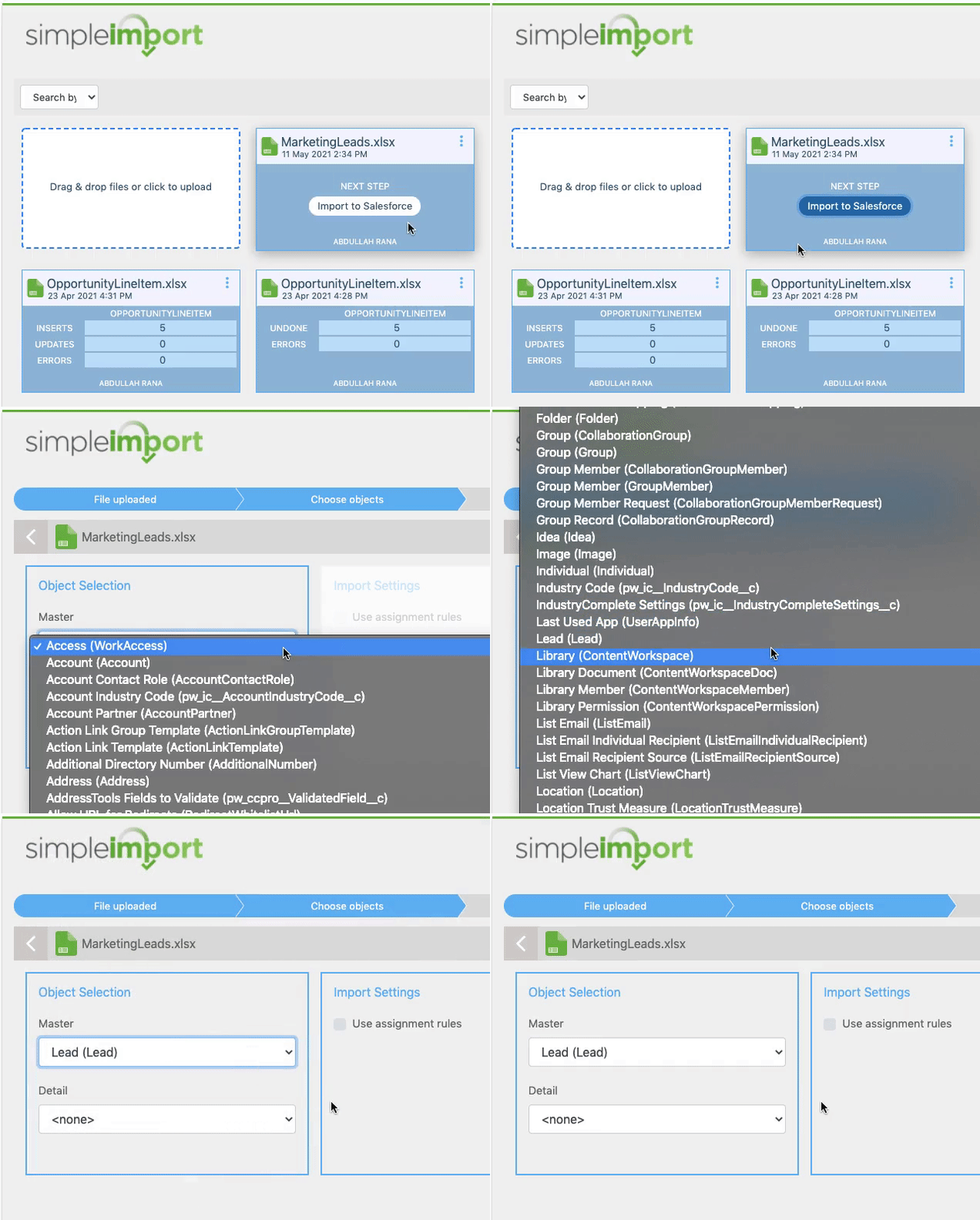
SimpleImport by ProvenWorks for Salesforce CRM allows you to import data from Excel into Salesforce without being an admin user. Administrators can choose to remain in control over the fields and objects users can import into by giving a non-admin user a license to SimpleImport with restrictions in place. These restrictions will allow the admin to specify the exact objects the user will have access to import into. See below, we’ve restricted this sales user to only be able to import into the Lead object.


Want to take it a step further and restrict the fields users can import into as well? Take a look at our guided import wizard functionality which gives users a drag and drop component with your predefined object and field mappings. This means that if a user were to try to import into a field that wasn’t configured in the mapping, the import would fail. You can open up importing to non-admin users with the assurance that they can only import into objects and fields specified by the admin.

Community and Portal User Imports

We understand that you don’t want community and portal users to be able to import into any object and fields in Salesforce, so our Managed Import component can also be used in a Salesforce Community. This is perfect for recurring imports like product and sales data, or deal registration.


Where to find SimpleImport

Install SimpleImport from the Salesforce AppExchange


Book a free demo

Arrange a free demo of SimpleImport to see it in action.