This guide applies to all upgrades to AddressTools Premium v10.6 and later, and covers the manual change you need to make per Lightning Record Page to move onto the new address verification Lightning Web Component.
What’s changing
In AddressTools Premium v10.6, the record page component has been rebuilt as a Lightning Web Component. AddressTools Component (Aura) is replaced by AddressTools Component (LWC).
The new component presents the same fields and the same functionality as before: the PowerSearch typeahead, the Verify button and address status handling all work exactly as your users expect.
There are some small cosmetic differences your users may notice from the change:
- The hyperlink actions for [Lookup Zip] and [QuickComplete Country] now appear beneath the ZIP code and country fields, instead of above.
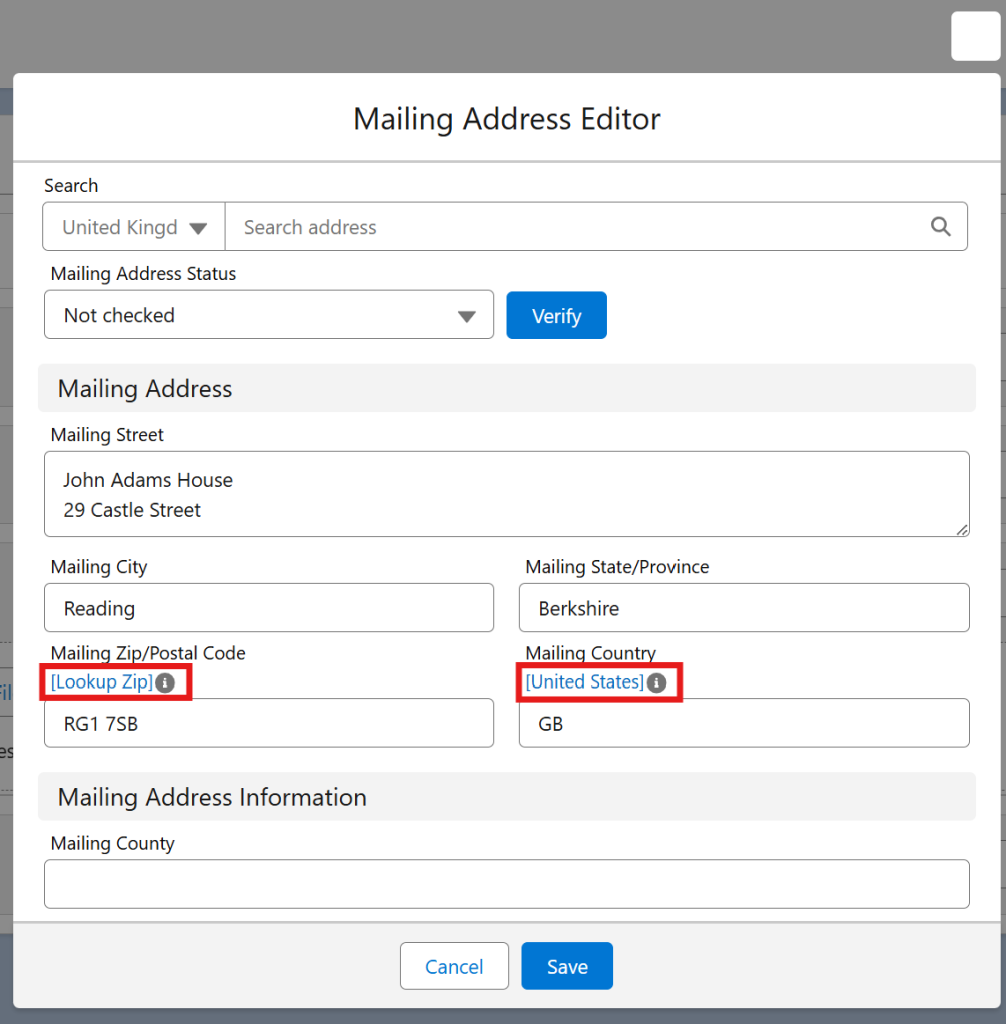
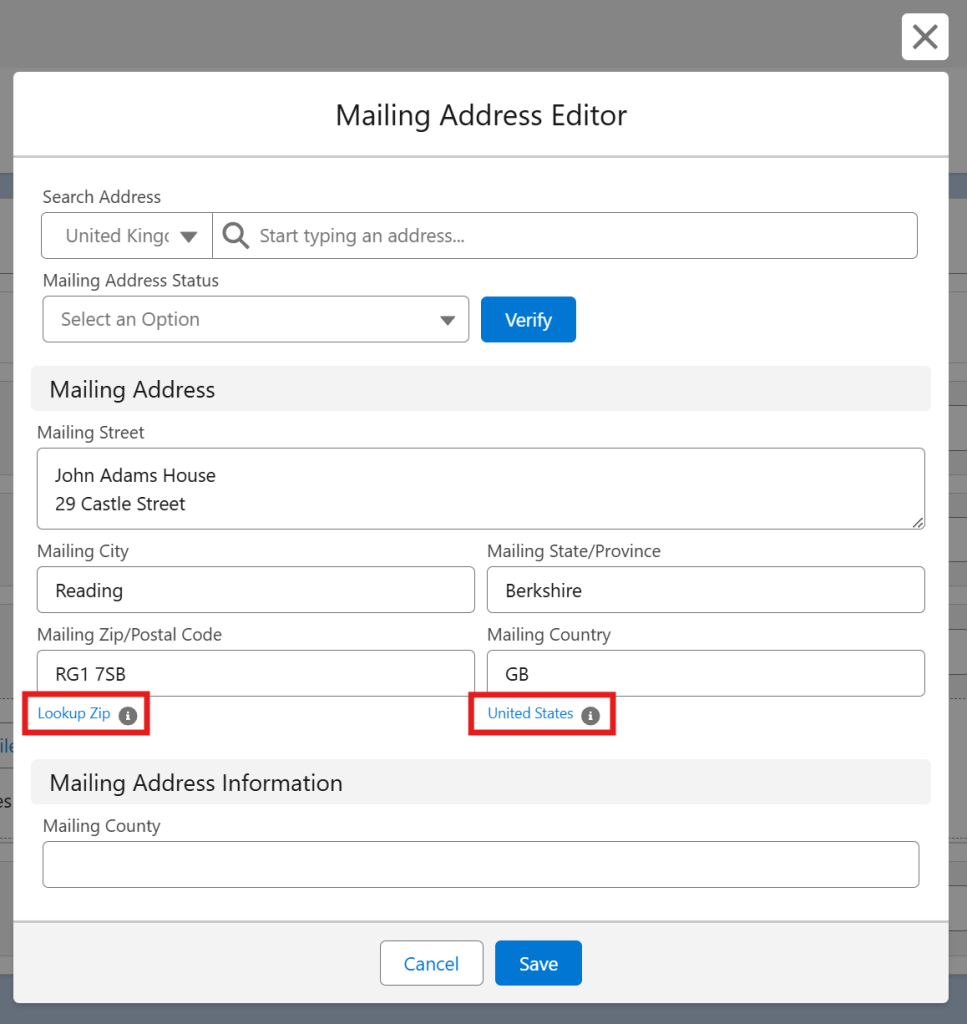
- In the PowerSearch results, the parts of each suggestion that match what the user has typed are now shown in bold. The Aura component returned the same suggestions in the same order, but displayed them as plain text.


No functionality is added or removed by these changes.
Why upgrade
AddressTools Component (LWC) loads faster and feels more responsive than its Aura predecessor. It can also be embedded in your own custom Lightning Web Components, which the previous version did not allow.
Note: AddressTools Component (Aura) remains supported after upgrading, so this is not a breaking change. The swap is an improvement your org will benefit from, and one we recommend making.
What you need to do
One change per Lightning Record Page: on each page that uses AddressTools Component (Aura), add AddressTools Component (LWC) and remove the old one.
Before you start
- Make sure to test in a sandbox first.
- Upgrade AddressTools Premium to v10.6 or later from the AppExchange. The new component does not appear in the Lightning App Builder until the package has been upgraded.
- Make a list of every Lightning Record Page that currently uses AddressTools Component (Aura), including pages for different record types, apps and profiles.
- For each one, note the current configuration of the component: the Address Block selected and any custom Component header title. You will re-enter these on the new component.
Swapping the component
Note: Both components appear in the Components panel with near-identical names. Make sure you are dragging the one marked AddressTools Component (LWC).
- Navigate to Setup | Object Manager | [Object] | Lightning Record Pages, and select Edit next to the page you want to update. Alternatively, open a record of that object and choose Setup (gear icon) | Edit Page.
- In the Lightning App Builder, under Custom – Managed in the Components panel on the left, find AddressTools Component (LWC) and drag it onto the canvas directly above or below the existing AddressTools Component (Aura).

- On the new component, choose the same Address Block you noted earlier, and re-enter the Component header title if you had one.
- Select AddressTools Component (Aura) on the canvas and click the delete icon to remove it.
- Click Save.
- Repeat for every Lightning Record Page on your list.

Note: a Lightning Web Component encapsulates its own styling. If you have applied custom CSS to the existing component, or have JavaScript or test automation written against its markup, test these in a sandbox before rolling out to production.
What happens automatically
Upgrading the managed package to v10.6 handles the following for you, with no action required:
- The AddressTools Override (
pw_ccpro__AddressToolsOverride, the component that replaces the standard New Record popup) is upgraded to the new verification experience automatically. Your existing button overrides stay in place. - Address Blocks, verification settings, validation rules and country/state data are untouched.
- Verification lookups, scheduled batch jobs and record-triggered flows continue to run as before.
FAQs
Will my users lose any functionality?
No. The new component provides the same features. There are some minor cosmetic differences — see What’s changing — but nothing is removed.
Will this change any of my address data or settings?
No. Nothing is written to your records and no configuration is reset by the swap.
Does the AddressTools Override need updating too?
No. The AddressTools Override is upgraded automatically as part of v10.6, and your existing button overrides stay in place.
I am upgrading from a version earlier than 10.0. Is there anything else?
Yes. v10.0 included a change to the permission model: you should no longer rely on the AddressTools packaged permission sets to grant users access to AddressTools objects. Review the v10 release notes before upgrading production.
More information
- Support: support@provenworks.com
- Release history: https://provenworks.com/products/addresstools/release-history/
- Upgrade best practice: How to upgrade an AppExchange app in 4 easy steps